claude-pool: run Claude Code across several Claude accounts and stop stalling on usage limits
claude-pool is a single-file, zero-dependency Node.js tool that pools several Claude subscriptions (Pro / Max)
for Claude Code. When the account a session runs on reaches its 5-hour or weekly usage limit, claude-pool
switches to the account with the most headroom left. It then resumes the same conversation
(claude --resume <id>) in the same terminal.
On Windows you also get:
- A transparent desktop widget that shows every account’s 5h / 7d limits.
- One-click login buttons for adding accounts.
- A background daemon that starts with Windows.
- Auto hi: a 1-token “hi” the moment an account’s 5h window resets, so the next window starts at once, around the clock.




Contents
- Features
- Requirements
- Quick start (Windows)
- Quick start (macOS / Linux)
- The desktop widget
- One-click login
- Auto hi at every 5h reset
- Live account switching in a session
- Background daemon and the default account
- Commands
- Configuration
- Files, tokens and security
- How usage limits are read
- FAQ
- Troubleshooting
- Uninstall
- Development
- Responsible use
Features
| Never stall on a limit | cpool starts Claude Code on the account with the most headroom. When that account runs out (5h or 7d at 99 %, or the API answers 429), the session moves to the next account and resumes the same conversation automatically. |
| Same conversation, next account | Swaps kill the claude process tree and relaunch claude --resume <session id> "continue where you left off" with the next account’s token, in the same terminal window. |
| Every limit at a glance | cpool limits and the desktop widget show 5h left, 7d left, time to each reset, and status (new terminals, in use, paused to 05:00, ready, needs login, login expired). |
| Pool capacity | Usable = weekly budget left across the pool, e.g. 21% · ≈1.2 of 6 accounts. |
| Reset forecast | 5h resets first acct2 in 56m · all in 4h56 (15:20) and the same for 7d. |
| One-click login (Windows) | A Log in button per account (and Log in all). It opens a private browser window, you sign in and click Authorize, and the token is captured and stored. |
| Auto hi | A 1-token message right after each 5h reset starts the next window immediately, 24/7 while the PC is awake. |
Default account for plain claude |
A daemon keeps the user env var CLAUDE_CODE_OAUTH_TOKEN on the best account, so new terminals and IDEs start on a live account. |
| Starts with Windows | cpool background on runs the daemon and widget hidden, now and at every logon. |
| One file, no installs | claude-pool.js only. Node 18+ standard library; the widget uses Windows PowerShell 5.1 + WPF, which ship with Windows. |
| Tokens stay local | Stored in your user folder with an owner-only ACL, never printed (last 4 characters at most), never sent anywhere but Anthropic’s API. |
Requirements
- Node.js 18 or newer (
node -v) - Claude Code installed (
claude --version): the nativeclaude.exeor the npmclaude.cmd - One or more Claude subscriptions (Pro or Max).
claude setup-tokenrequires a subscription; organisation policies can disable it. - Desktop widget, background mode and one-click login: Windows 10 1809+ or Windows 11. Everything else works on macOS and Linux too.
Quick start (Windows)
git clone https://github.com/shakeebshaan/claude-pool
cd claude-pool
node claude-pool.js install
install copies the script to %USERPROFILE%\.claude-pool\ and writes the cpool command (plus the alias
claude-p). It puts that folder on your user PATH and locks the folder to your Windows user. Your real claude is
not touched. Open a new terminal, then:
cpool background on
The widget appears in the top-right of the desktop. Click + Add account for each subscription, or Log in all when the accounts are already listed. Sign in to each one in the private window and click Authorize. Then just use:
cpool                         :: Claude Code on the best account; swaps live when a limit is hit
cpool --model opus "fix the failing tests"
cpool -c                      :: continue the last conversation
cpool limits                  :: table of all accounts
Everything after cpool is passed to claude unchanged.
Prefer typing claude? Run cpool shim on. A small claude.exe goes first on your user PATH, and in new terminals
claude then starts a pool session with live account switching. Commands that are not sessions (claude update,
claude mcp ..., claude doctor, claude -p ..., claude --bg, --version, --help) go straight to the real
claude. Programs that run claude by full path, such as the VS Code chat panel, are not affected. cpool shim shows
what new terminals will run; cpool shim off undoes it.
Quick start (macOS / Linux)
git clone https://github.com/shakeebshaan/claude-pool
cd claude-pool
node claude-pool.js install
export PATH="$HOME/.claude-pool/bin:$PATH"     # add this line to your shell rc

claude setup-token          # sign in with the first account; prints a long-lived token
cpool add work              # paste it (hidden input)
claude setup-token          # sign in with the next account
cpool add personal
cpool limits
cpool                       # Claude Code on the best account, live swaps

cpool daemon 2              # optional: auto hi + default account (cpool use writes ~/.claude-pool/env.sh)
The desktop widget
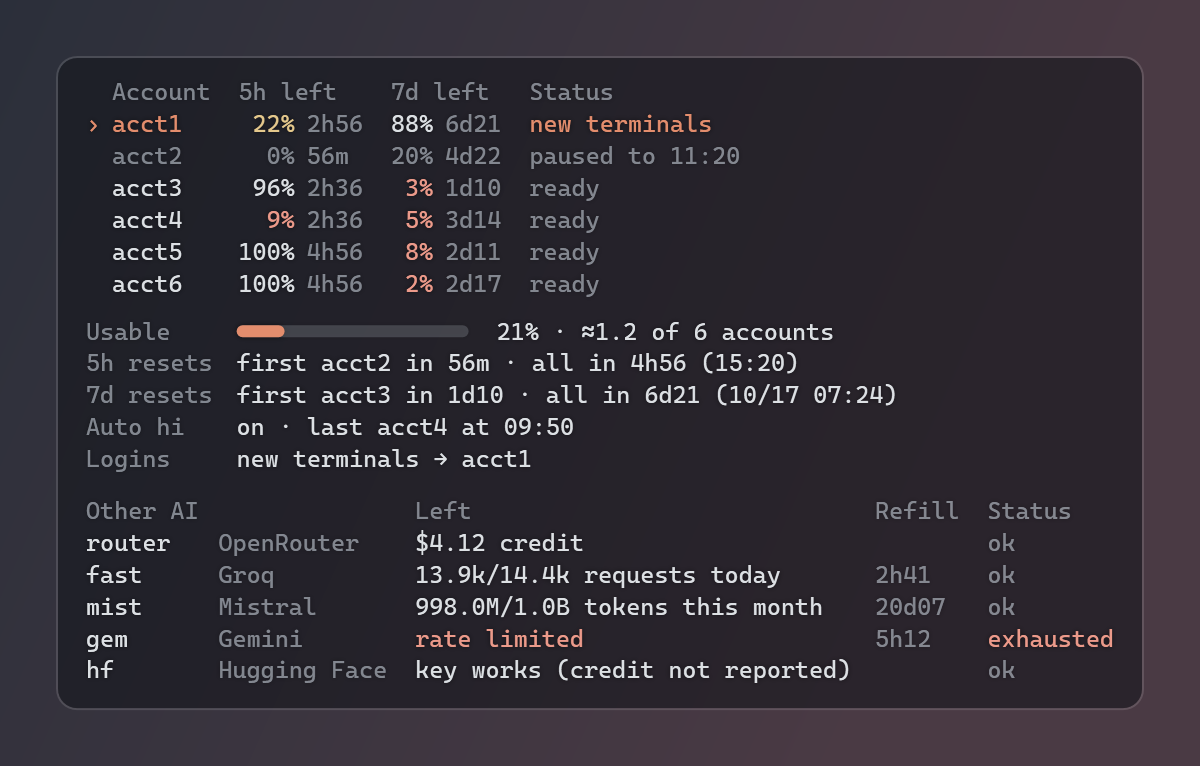
The widget is a small transparent panel that sits on the desktop behind your windows (it is owned by the desktop
window) and is not in the taskbar or Alt+Tab. It only reads snapshot.json, which the daemon writes every 15 seconds;
it never sees a token.
  Account  5h left     7d left     Status
› acct1     22% 2h56    88% 6d21   new terminals
  acct2      0% 56m     20% 4d22   paused to 11:20
  acct3     96% 2h36     3% 1d10   ready
Usable     ━━━━──────────  21% · ≈1.2 of 6 accounts
5h resets  first acct2 in 56m · all in 4h56 (15:20)
7d resets  first acct3 in 1d10 · all in 6d21 (10/17 07:24)
Auto hi    on · last acct4 at 09:50
Logins     new terminals → acct1 · claude /login → acct3
- › marks the account new terminals start on (the daemon’s default, the user env var
CLAUDE_CODE_OAUTH_TOKEN) and accounts acpoolsession is running on (in use). - Logins shows both logins on the PC: the account new terminals get, and the account
claude /loginis signed in to (what/statusshows). The second one is used by Claude Code started before the default was set, and by the VS Code extension’s chat panel, which keeps its own login even after a restart. Claude Code in a terminal (including VS Code’s integrated terminal) uses the pool, and/statusthere showsAuth token: CLAUDE_CODE_OAUTH_TOKEN. Usecpoolin a terminal for automatic switching, or/loginin the panel to pick an account with room. The/loginaccount is shown as a pool account name when one has that email (--email), or when exactly one account has the same 5h and weekly windows (same reset times, similar use). If the account name and the mailbox differ, the email is shown too, e.g.acct1 (acct2@example.com), so crossed names are easy to spot. Otherwise only the email is shown; it never guesses. - 5h left / 7d left: percent of each limit still available, and the time until that window resets. Values of 10 % or less are tinted red, 30 % or less amber.
- Usable: weekly budget left across the pool, sum of 7d left ÷ (accounts × 100). For example “≈1.2” means about 1.2 full accounts of weekly usage remain (rounded down, so it never overstates).
- 5h / 7d resets: the soonest reset among accounts that used that window, and when all of them are full again. Times are local.
- Auto hi: on / off, and the last account that got its hi.
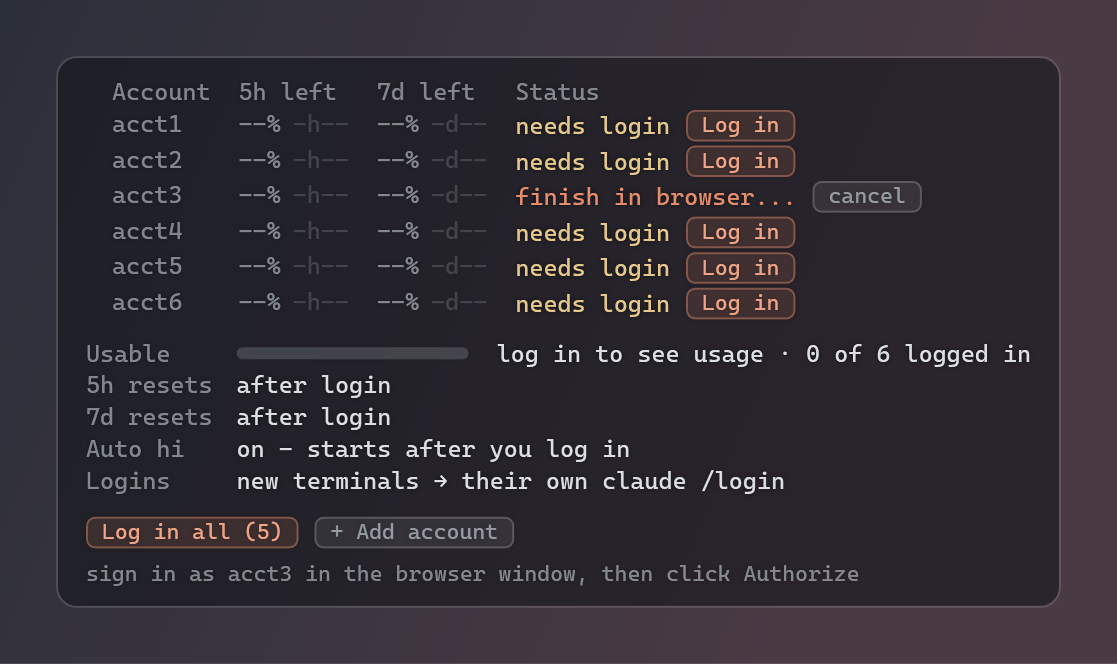
- Accounts not logged in yet show placeholders (
--% -h--) and a Log in button. Until the first login the summary lines say what will appear (after login). - Drag to move it (the position is remembered; on the right half it grows leftwards). Right-click: Refresh now, Add account…, Re-login account ▸ (every account), Auto hi at every 5h reset, Background (clear / glass / solid), Lock position, Close widget.
- When the daemon stops, the widget dims and says so. If Explorer restarts, the daemon brings the widget back.
One-click login
Each Log in click (or cpool login <name> in a terminal) does this:
- Runs
claude setup-tokenhidden. It is an interactive terminal screen, so a small C# helper (compiled once into the pool folder, about 8 KB, built with the C# compiler that ships with Windows) hosts it in an invisible 400-column pseudo console (ConPTY). - The same helper is set as claude’s
BROWSERcommand, which is how claude-pool receives the sign-in URL. It opens that URL in a private window of your default browser: Chrome, Brave, Vivaldi and other Chromium browsers (--incognito), Edge (--inprivate), Firefox (-private-window), Opera (--private). - You sign in as that account and click Authorize. claude’s local callback completes and the token is printed on the hidden screen. claude-pool reads it there and stores it, then checks it with one limit probe.
Why a private window? A normal browser window would authorize whichever claude.ai account it is already signed in
to, and you could add the same account twice. With --email (or the email field in Add account) the sign-in page is
pre-filled through the official login_hint parameter.
Log in all queues every account that needs login; the daemon runs them one after another. While a login runs the
row shows finish in browser… with a cancel button. A sign-in not finished within 10 minutes is dropped.
Failures stay at the bottom of the widget for 5 minutes. CLAUDE_POOL_LOGIN_BROWSER=normal uses a normal window, and
none only prints the URL.
Setup tokens are valid for about a year. When one stops working, the account shows login expired with a
Log in button. To switch an account that is already logged in to another login (for example after signing in
with the wrong account), right-click the widget → Re-login account → the account, or run cpool login <name>.
The new token replaces the old one.
Other AI providers (API keys)
The widget can also show your other AI keys - free tiers included - under the Claude accounts: what is left, when it refills, and whether the key is ok, low, exhausted or invalid.
cpool keys import keys.txt     :: lines like  groq_api = "gsk_..."  or  OPENROUTER_API_KEY=sk-or-v1-...
cpool keys                     :: table: key, provider, left, refill, status
cpool keys check               :: check them all now (the daemon does it every 30 min and on Refresh)
cpool keys add <name>          :: add one (asked for, hidden)  -  remove | on | off <name>  -  show | hide (widget)
Each provider is checked with the cheapest call that returns something real, never a guess:
| Provider | What is shown | How |
|---|---|---|
| OpenRouter | credit left / key limit left | free account endpoints |
| Groq | requests left today + refill time | rate-limit headers of a 1-token request (free tier) |
| Mistral | tokens left this month, or “plan allows 0 requests/min” | rate-limit headers of a 1-token request |
| DeepSeek | balance | free balance endpoint |
| Gemini, Cohere, Together, Cloudflare, Hugging Face, Replicate, OpenAI | key works / rejected / out of credit / rate limited | free key check (these report no quota) |
| NVIDIA | not checked | its free credits can only be read by spending one |
A rejected value that looks like an ID (org_..., key_...) is called out as “an ID, not the secret key”. Keys are
stored in providers.json in the owner-only pool folder. Each key is sent only to its own provider, and keys never
appear in output, logs or the widget data: stored values are redacted even when their format has no recognisable
prefix. Right-click the widget → Show other AI keys to show or hide the section.
Auto hi at every 5h reset
A Claude 5-hour window starts with the first message after the previous window ended. claude-pool tracks every account’s reset time, and 5 seconds after it passes the daemon sends that account a 1-token “hi”. That is the same tiny Haiku request it uses to read limits. The next window starts right away instead of whenever you happen to use the account, so the following reset comes as early as possible. This runs around the clock as long as the PC is awake and the daemon runs.
- Skipped for accounts whose weekly limit is used up (a hi cannot start anything), that are not logged in, or whose login expired.
- If the window has not actually reset yet, it tries again a minute later.
- Cost: one request with a few input tokens and one output token per account per window.
- Off:
cpool autohi off, the widget’s right-click menu, orCLAUDE_POOL_AUTO_HI=0.
Live account switching in a session
cpool [claude args] is a wrapper around claude:
- Pick: the enabled, logged-in, unpaused account with the most usable headroom = min(5h left, 7d left). Ties go
to pool order (
cpool first,cpool reorder). - Launch:
claudewith that account’s token inCLAUDE_CODE_OAUTH_TOKEN. New sessions get a fixed--session-idso they can be resumed. - Monitor: every 90 s it reads the account’s limits (cached and shared between all
cpoolwindows for 60 s). - Swap: when the account is out (5h or 7d at 99 % or more, or a 429), the account is paused until its reset.
The claude process tree is killed and
claude --resume <id> "continue where you left off"starts on the next account. The id is the conversation claude is on at that moment, read from Claude Code’s per-process registry (~/.claude/sessions/<pid>.json), so it follows/resumeand/clearinside claude, including conversations saved under another project folder. If that conversation was never saved, a fresh session starts instead. If claude exits with an error on its own (for example Failed to authenticate), the account is re-checked and the session swaps instead of dying. - All out: it prints the soonest reset, counts down and resumes by itself. More than 20 swaps in 10 minutes stops it, as a safety net.
Wrapper flags (never passed to claude): --pool-account <name>, --pool-poll <seconds>, --pool-no-continue,
--pool-continue-prompt "<text>".
Background daemon and the default account
cpool daemon [minutes] (or cpool background on, which runs cpool daemon 2 --widget hidden at every logon):
- Re-reads all accounts every minutes and keeps the user env var
CLAUDE_CODE_OAUTH_TOKENon the best one. It only switches when another account has 10 or more points more headroom, so it does not flap between near-equal accounts. - Writes
snapshot.jsonfor the widget every 15 s, runs auto hi, runs widget login requests, and restarts the widget if it dies. - Only one daemon runs per pool folder. Changes made with
add,remove,on,offorresettrigger an immediate re-check.
How it starts with Windows: background on registers two things, both running wscript background.vbs (no window).
- A Task Scheduler task named
claude-pool, triggered when you sign in. It starts within seconds, and no admin rights are needed. It also repeats every 10 minutes as a watchdog: a running daemon makes the extra start exit at once, and a crashed one is back within 10 minutes. - A startup entry under
HKCU\...\Runas a backup. Windows runs those one at a time, waiting up to about 30 s for each app before it, so on a busy PC it can be minutes after sign-in before this one runs.
Whichever starts first runs the daemon; the other sees it running and exits. cpool background shows both, and
background off removes both.
cpool use [name|best|off] sets or removes that default by hand. Only new terminals pick it up; a running plain
claude keeps the token it started with. Use cpool for live swaps.
Commands
| Command | What it does |
|---|---|
cpool [claude args] |
Run Claude Code on the best account with live swaps (also cpool run ...) |
cpool limits |
Table of every account: 5h left, 7d left, time to reset, status, plus usable / reset / auto hi lines |
cpool login <name> [--email <a>] |
One-click login in a private browser window (Windows); creates the account if needed |
cpool add <name> [token] |
Add or replace an account by token (hidden prompt if omitted) |
cpool add <name> --later [--email <a>] |
Add an account as needs login (Log in button on the widget) |
cpool list |
Accounts in pool order (token tails only) |
cpool remove / rename / on / off <name> |
Manage accounts (off = never picked) |
cpool first <name> / reorder <name> <pos> |
Pool order (the tie-breaker) |
cpool reset [name] |
Clear paused / login-expired flags |
cpool use [name\|best\|off] |
Set or remove the user-level CLAUDE_CODE_OAUTH_TOKEN |
cpool daemon [minutes] [--widget] |
Default account + auto hi + widget data (default every 5 min) |
cpool background [on\|off] |
Windows: daemon (2 min) + widget, hidden, now and at every logon; no argument = status |
cpool widget [stop] |
Show / close the desktop widget |
cpool autohi [on\|off] |
Auto hi at every 5h reset (default on) |
cpool keys [check \| import <file> \| add <name> \| remove\|on\|off <name> \| show\|hide] |
Other AI providers’ API keys: what is left, refill time, status (also on the widget) |
cpool shim [on\|off] |
Windows: plain claude in new terminals starts a pool session (non-session commands pass through); no argument = status |
cpool install |
Copy to ~/.claude-pool, write the cpool / claude-p shims, add them to PATH |
cpool help / version |
Usage / version |
Configuration
| Variable | Default | Meaning |
|---|---|---|
CLAUDE_POOL_HOME |
~/.claude-pool |
Pool folder (accounts, state, logs) |
CLAUDE_POOL_CLAUDE_BIN |
auto (where claude) |
Path to claude.exe / claude.cmd / claude |
CLAUDE_POOL_POLL_MS |
90000 |
Limit check interval inside cpool sessions |
CLAUDE_POOL_CACHE_MS |
60000 |
How long a limit reading is shared between processes |
CLAUDE_POOL_CONTINUE |
1 |
0 = after a swap, resume without the automatic prompt |
CLAUDE_POOL_AUTO_HI |
1 |
0 = no auto hi |
CLAUDE_POOL_LOGIN_BROWSER |
private |
normal window, or none (print the URL only) |
CLAUDE_POOL_PROBE_URL |
https://api.anthropic.com |
API base (tests point it at a mock) |
CLAUDE_POOL_PROBE_MODEL |
claude-haiku-5-5 |
Model for the 1-token limit probe; if it is retired (404), the probe falls back to the next known Haiku |
CLAUDE_POOL_NO_SYSTEM |
unset | 1 = never touch registry, ACLs, PATH, or start processes (tests) |
Files, tokens and security
Everything lives in ~/.claude-pool (%USERPROFILE%\.claude-pool):
| File | Contents |
|---|---|
accounts.json |
Account names, tokens, optional sign-in email hint, flags |
state.json |
Shared limit cache, live cpool sessions, current default account |
snapshot.json |
What the widget shows: names and numbers only, no tokens |
login.json, login.queue, autohi.json |
Login progress, queued widget logins, last auto hi |
providers.json, providers-state.json |
Other AI keys (owner-only) and their last check results (no keys) |
cli-usage.json |
5h / 7d usage of the claude /login account (for the Logins line; no token) |
widget.ps1, widget.vbs, background.vbs, widget-prefs.json |
Widget script (rewritten on start), hidden launchers, position / background |
cpool-helper-*.exe / .cs |
The login helper and its source |
pool.log, widget.log |
Logs (tokens redacted), rotated at 2 MB / 1 MB with one previous file kept |
claude-commands.json |
claude’s subcommand list read from claude --help (re-read only when claude changes) |
- On Windows the folder ACL is reduced to your user when it is created (
icacls /inheritance:r); on macOS / Linux it is0700. - Every line claude-pool prints or logs passes through a redactor that shortens any
sk-ant-...token to its last 4 characters. The tests check that no token reaches stdout, stderr, logs or the widget data. - Tokens are only sent to
api.anthropic.com(limit probes) and passed toclaudein its environment. - The default account (
cpool use, the daemon) is written to the user env varCLAUDE_CODE_OAUTH_TOKEN, so every program you start can read that one token. That is how plainclaudepicks it up. If you don’t want it,cpool use off, and start Claude throughcpool/ the shim instead. - Prefer
cpool add <name>(hidden prompt) or the widget’s Log in overcpool add <name> <token>: a token typed on the command line lands in your shell history. accounts.jsonis never overwritten after a failed read: if it can’t be parsed, cpool stops with an error. A copy of the last good version is kept asaccounts.json.bak.- claude is only ever started from PATH, never from the current folder, and never through cmd.exe with your
arguments (npm’s
claude.cmdis run asnode <cli.js>). - For the Logins line the daemon reads the access token of your
claude /loginfrom~/.claude/.credentials.json, read-only and every 5 minutes. It calls Anthropic’s usage endpoint with it (the same call/usagemakes, which spends no tokens). It never refreshes, stores or prints that token, and skips the call when the token has expired. - The login helper never stores the screen; the captured token goes straight into
accounts.json.
How usage limits are read
Setup tokens get HTTP 429 from the usage endpoint, but every /v1/messages response carries the headers
anthropic-ratelimit-unified-5h-utilization, -5h-reset, -7d-utilization and -7d-reset. claude-pool sends a
1-token Haiku request (“hi”) and reads them. Readings are cached for 60 s in state.json and shared between all
cpool processes, so many windows do not multiply probes. Each probe spends a sliver of the account’s usage.
FAQ
What happens when Claude Code hits the usage limit?
In a cpool session the account is paused until its reset. Claude is restarted on the account with the most
headroom and resumes the same conversation with a short “continue where you left off” prompt. A plain claude
session started outside cpool stops as usual.
Does claude-pool bypass Claude’s usage limits? No. Every account keeps its own 5-hour and weekly limits, enforced by Anthropic. claude-pool only decides which of your accounts to use and switches when one is exhausted.
Does it work with Claude Pro, Max, Team or Enterprise?
It needs claude setup-token, which requires a Claude subscription. Pro and Max work. On Team / Enterprise it
depends on your organisation’s policy.
Where is my token stored? Is it safe?
In ~/.claude-pool/accounts.json, readable only by your user. It is never printed, logged or shown in the widget.
Why does login open a private window? So you sign in as the account you clicked, not whichever account your browser is already signed in to.
What does auto hi cost?
One tiny Haiku request per account per 5-hour window. Turn it off with cpool autohi off.
Does it run 24/7? While the PC is awake and logged in. Sleep and hibernation pause it; on wake it catches up within seconds.
Can I use it without the widget, or on a server?
Yes. cpool, cpool limits and cpool daemon work in any terminal on Windows, macOS and Linux.
Does it change my normal claude login?
Only if the daemon or cpool use sets the user env var CLAUDE_CODE_OAUTH_TOKEN, which takes precedence over
claude /login in new terminals. cpool use off removes it.
Troubleshooting
| Symptom | Fix |
|---|---|
cpool is not recognised |
Open a new terminal (PATH changed), or run node %USERPROFILE%\.claude-pool\claude-pool.js |
| No widget on the desktop | cpool background (status), then cpool widget; see %USERPROFILE%\.claude-pool\widget.log |
| Widget says pool daemon not running | cpool background on |
| Login: not finished within 10 minutes | Click Log in again and finish in the private window; try CLAUDE_POOL_LOGIN_BROWSER=normal |
| Account shows login expired | Click Log in (or cpool login <name>) |
could not start claude |
Set CLAUDE_POOL_CLAUDE_BIN to your claude.exe / claude.cmd |
% in prompts changes |
npm installs claude.cmd, which runs through cmd.exe; the native claude.exe has no such quirk |
Uninstall
cpool background off
cpool shim off
cpool use off
Then delete %USERPROFILE%\.claude-pool and remove %USERPROFILE%\.claude-pool\bin from your user PATH.
Development
- One file:
claude-pool.js. The widget (PowerShell + WPF) and the login helper (C#) are embedded and written out at runtime. Keep them free of backticks and${, because they live in JavaScript template literals. - Tests:
npm test(=node --test test/widget.test.js). They cover the snapshot model, the daemon end to end against a mock API, the widget rendered headless (widget.ps1 -SelfTest), login through the real pseudo console with a fakeclaude, the login queue and cancel, auto hi timing, and that no token leaks. - The README images are rendered offscreen by
widget.ps1 -SelfTest -Png <file>from demo data.
Responsible use
claude-pool uses only official mechanisms: claude setup-token, CLAUDE_CODE_OAUTH_TOKEN, claude --resume, and
the rate-limit headers of the Messages API. Whether and how you may use several subscriptions together is between
you and Anthropic; read the Consumer Terms and the
Usage Policy. The software is provided as is, without warranty.